If your IQOS ILUMA i is flashing a light or showing a strange symbol on its screen, it is trying to tell you something. Most of the time, it is nothing serious. A red light usually means the device needs a reset or a bit more charge. A white light usually means it is warming up, charging, or working exactly as it should. An amber (or orange/yellow) light almost always means the battery is low.
Quick answer: IQOS ILUMA i Devices communicate through a small touchscreen on the holder, showing shapes like a circle or lines instead of colored lights. The older IQOS ILUMA and the IQOS ILUMA i ONE use actual colored lights, mainly white, red, and amber (also called yellow or orange). Once you know which device you own, reading these signals takes seconds.
This guide walks through both systems clearly, then covers what to do when something looks wrong, including a few things that show up more often here in the UAE than anywhere else.
Which IQOS ILUMA Device Do You Have?
Before anything else, figure out which device is in your hand. This one step saves you from troubleshooting the wrong problem entirely.
| Device | Signal type | How to spot it |
| IQOS ILUMA | Colored lights | Separate holder and pocket charger, round LED dots on both |
| IQOS ILUMA ONE | Colored lights | All in one device, no separate pocket charger, light strip on the body |
| IQOS ILUMA i Standard | Touchscreen | Separate holder and pocket charger, small screen on the holder tip |
| IQOS ILUMA i ONE | Colored lights | All-in-one device, light strip similar to the original ILUMA ONE |
| IQOS ILUMA i PRIME | Touchscreen | Separate holder and pocket charger, premium leather wrap, screen on the holder tip |
If you see a tiny screen with shapes on it, jump to the touchscreen section below. If you see plain colored dots or a light strip, jump to the colored light section instead.
IQOS ILUMA i Standard and ILUMA i Prime: What the Touchscreen Symbols Mean
These two devices dropped the old colored lights in favor of a small touchscreen built into the holder. It shows shapes rather than colors, and each shape has its own job.
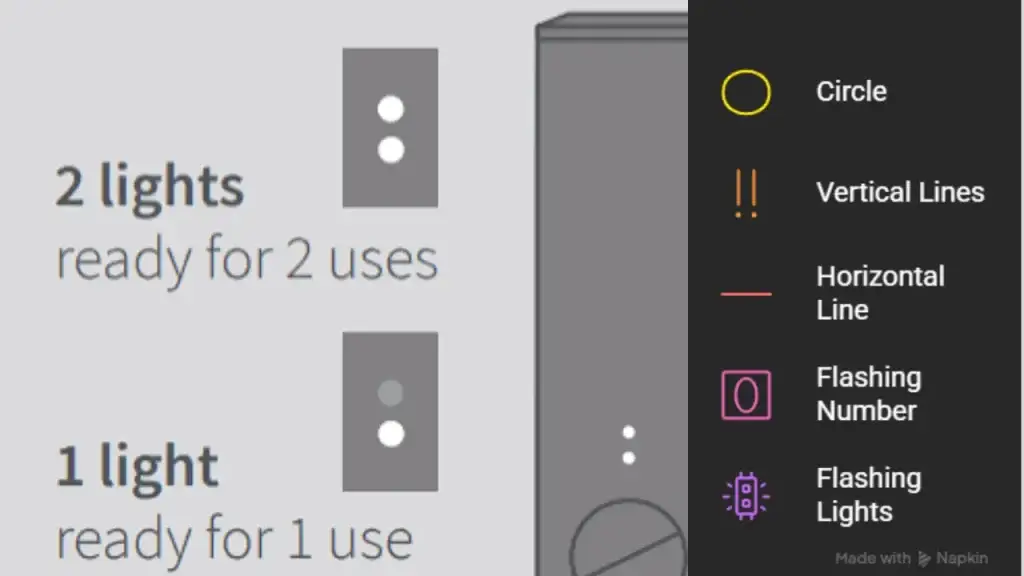
A circle on the screen
When the screen shows a solid circle, your holder is either warming up or already ready to use. If it just started forming, give it a few seconds. Once the circle is complete, you are good to go.
Two vertical lines
Two vertical lines mean Pause mode is available or already active. This feature lets you stop mid session and pick it up again later, as long as you resume within the time window. If you swipe up and the circle comes back, heating has restarted and you can continue.
One horizontal line
A single horizontal line tells you Eco mode is switched on. This trims battery use a little compared to Performance mode, which is worth knowing if you are trying to stretch a charge through a long day.
The number 0 flashing three times
If you see 0 flash three times, your holder battery has run out completely. There is no trick here. Place the holder back in the pocket charger and let it top up before your next session.
Top and bottom lights flashing white
This one confuses a lot of people because it looks like an error. It is not. It means Device Lock is turned on. Open the IQOS app, go to device settings, and switch the lock off from there.
IQOS ILUMA i ONE and Classic ILUMA: Red, White, and Amber Light Meanings
If your IQOS ILUMA i One device uses actual colored lights instead of a screen, here is what each one is telling you.
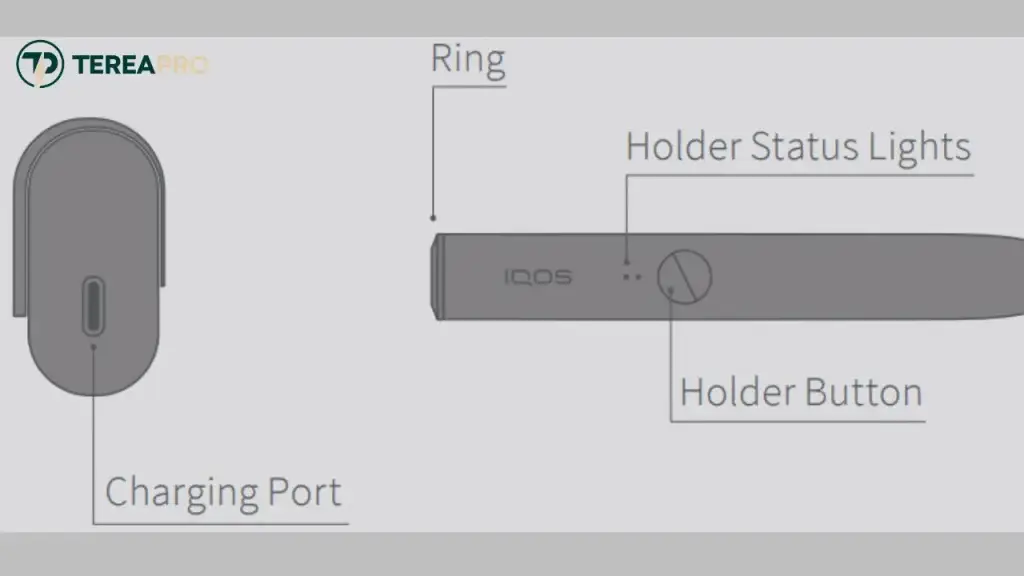
White light
White is the normal, everyday color, and it shows up in a few different situations.
- Pulsing white while a stick is inserted means the device is preheating. Wait until it settles before you start using it.
- Solid white dots after a short button press show your remaining charge. Two lights usually mean two uses left, one light means one use.
- Blinking white a few times in a row often points to the device sitting outside its normal temperature range, usually between 0 and 40 degrees Celsius. Let it sit somewhere at room temperature for a few minutes and try again.
Red light
Red is the color that gets people worried, but most of the time it has a simple fix.
- A blinking red light on the holder usually means the device needs a reset, or in rare cases, it has been placed too close to a magnet, which throws off its internal calibration.
- A blinking red light on the pocket charger almost always means the holder inside is running low and needs a charge.
Either way, a quick reset (covered below) clears most of these on the first try.
Amber light (also called yellow or orange)
This is the light people search for the most, partly because the word amber sounds unusual next to red and white.
Important to know: amber, orange, and yellow all describe the exact same signal depending on which source you read. It has nothing to do with the TEREA Amber tobacco flavor, even though the naming overlap trips a lot of users up.
An amber or yellow blinking light simply means the battery is depleted and the holder needs to go back into the charger. There is no deeper mystery to it than that.
Quick Reference Table: Every IQOS ILUMA i Signal at a Glance
This table brings every signal covered above into one place, so you can check it in a few seconds without scrolling back through the whole guide.
| Signal | Applies to | What it means | Quick fix |
| Circle on screen | ILUMA i, ILUMA i PRIME | Warming up or ready | Wait for full circle, then use |
| Two vertical lines | ILUMA i PRIME | Pause mode available or active | Swipe up to resume |
| One horizontal line | ILUMA i PRIME | Eco mode active | Switch to Performance mode in app if needed |
| Flashing 0 (x3) | IQOS ILUMA i PRIME | Holder fully discharged | Place in pocket charger |
| Top and bottom lights flashing white | ILUMA i PRIME | Device lock active | Unlock through IQOS app |
| Pulsing white | IQOS ILUMA i Standard | Preheating stick | Wait until pulsing stops |
| Solid white dots | ILUMA, ILUMA i ONE | Remaining charge level | Check count of lit dots |
| Blinking red (holder) | ILUMA i Standard | Reset needed or magnet nearby | Reset device, move away from magnets |
| Blinking red (pocket charger) | ILUMA, ILUMA i ONE | Holder charge is low | Charge the holder |
| Blinking amber/yellow/orange | ILUMA i ONE | Battery depleted | Recharge the holder |
How to Reset Your IQOS ILUMA i Device: Step-by-Step Guide
A reset solves more problems than people expect, and it takes under a minute.
For IQOS ILUMA i Standard and ILUMA i PRIME:
- Place the holder inside the pocket charger and close the door fully.
- Press and hold the pocket charger button for about 10 seconds.
- Keep holding until the lights fade out completely.
- Release the button and wait for a quick flash and a vibration. That confirms the reset worked.
For IQOS ILUMA i ONE:
- Press and hold the button on the device itself for around 7 to 10 seconds.
- Watch for all lights to turn off, blink twice, then come back on.
- That double blink is your confirmation the reset is complete.
If the same warning comes right back after a reset, move on to the climate section below or the support section further down.
Troubleshooting IQOS ILUMA i in UAE Weather
Dubai and the wider UAE throw a specific set of challenges at any device with a battery inside, and IQOS ILUMA i is no exception.
Heat exposure
Leaving your device in a parked car during summer, or in direct sun on a balcony or car dashboard, pushes it outside its safe operating range fast. This is one of the most common reasons UAE users see more temperature-related warnings than users in cooler countries. Keep the device in a bag, a pocket, or an air-conditioned space whenever possible.
Humidity and stick storage
TEREA sticks are sensitive to how they are stored. An environment that is too humid or too dry can affect how the stick performs once it is inserted, even if the device itself is working fine. Keep unopened packs sealed and away from direct humidity or extreme dryness.
Sand and dust on charging contacts
Fine sand and dust get into pockets, bags, and car interiors more easily here than in most places, and they tend to settle right on the metal charging contacts between the holder and pocket charger. Wipe these contacts with a dry cloth every so often, especially if you notice charging becoming less reliable.
A simple daily habit fixes most of this: keep the device somewhere cool and dry, avoid leaving it in a car, and clean the contacts every ten to fifteen uses. That alone prevents the majority of warning signals UAE users run into.
When to Contact IQOS Support or Visit a Boutique
Most light and screen warnings clear up with a simple reset or a charge. Reach out for help if any of these happen instead.
- A red light or error keeps returning even after multiple resets
- You notice visible physical damage or a burning smell
- The device shows no response at all after a long charge and a reset
- Charging stays inconsistent even after cleaning the contacts
In the UAE, you can reach IQOS through the official site, use the online self-diagnostics tool, or visit an IQOS Boutique in person for a hands-on check. Once you know which device you are holding and what each signal actually means, most IQOS ILUMA i issues take less than a minute to sort out. Keep this guidebook marked for the next time a light or symbol catches you off guard.
Where to Buy a Genuine IQOS ILUMA i Device in the UAE
Buying your IQOS ILUMA i device from a trusted UAE retailer like Terea Pro helps you avoid counterfeit products that may have poor battery performance, charging issues, or unreliable heating technology. An authentic device delivers the smooth, consistent experience IQOS is designed for, along with full compatibility with genuine TEREA flavors. Purchasing from a verified seller such as Terea Pro also ensures you receive a factory-sealed device with the correct accessories and warranty support, making your investment safer and more reliable.
Frequently Asked Questions
What does the red light mean on IQOS ILUMA i?
On devices with colored lights, a blinking red light usually means the holder needs a reset, or occasionally that it was placed too close to a magnet. If it appears on the pocket charger instead, it means the holder inside needs charging.
Why is my IQOS ILUMA i showing amber or orange light?
Amber, orange, and yellow all point to the same thing: the battery is depleted and needs recharging. It is unrelated to the TEREA Amber flavor name.
What does the circle on the IQOS ILUMA i touchscreen mean?
A circle shows the holder is warming up or fully ready for use. Wait until the circle completes before you start.
Why is my IQOS ILUMA i flashing white?
White usually signals normal activity like preheating or charging. If it blinks a few times in a row, the device is likely outside its ideal temperature range and just needs a few minutes to settle.
How do I reset my IQOS ILUMA i?
Place the holder in the pocket charger, hold the charger button for about 10 seconds until the lights fade, then release and wait for the confirmation flash and vibration.
Is a red or blinking light dangerous?
No, in almost every case it is a normal status warning, not a safety issue. A reset or a charge resolves the vast majority of these signals.
Does UAE heat cause more light warnings on IQOS ILUMA i?
Yes. High temperatures from parked cars or direct sun push the device outside its normal operating range more often here than in cooler climates, which triggers more temperature related warnings.
A Quick Word Before You Go: This product is not risk-free and provides nicotine, which is addictive. Only for use by adults.