The IQOS ILUMA i Standard is a heated tobacco device made for TEREA SMARTCORE STICKS. IQOS UAE lists it simply as the IQOS ILUMA i, while UAE retailers add Standard to tell it apart from the Prime and ONE models. It has two main physical units, the Holder and the Pocket Charger. This guide covers each visible part and what it is for.
IQOS ILUMA i Standard at a Glance
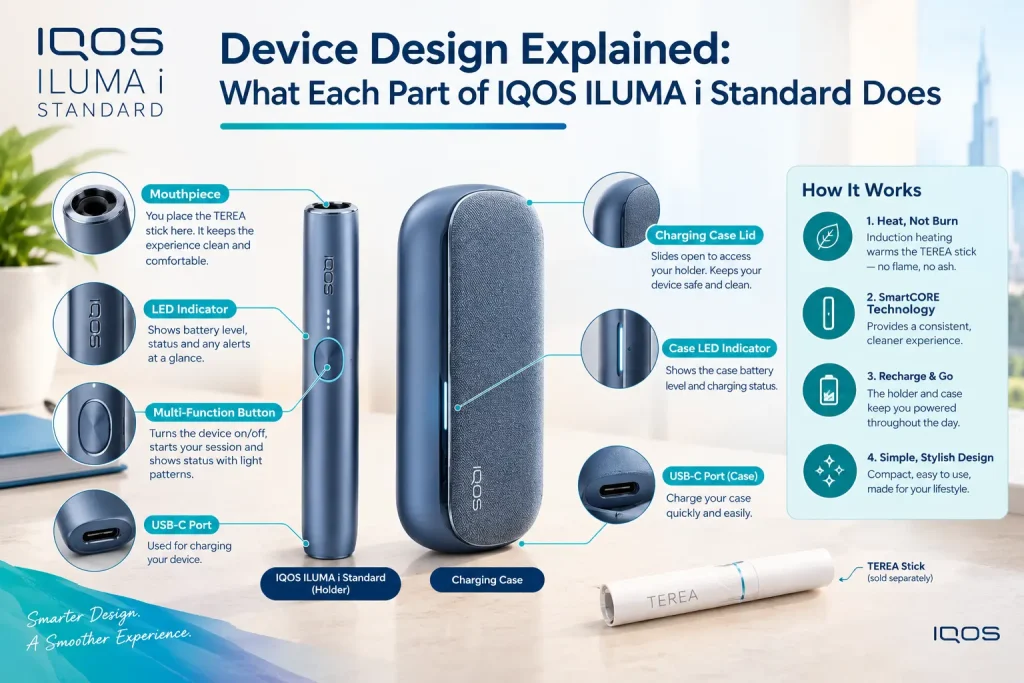
Before the detail, here is the layout. The IQOS ILUMA i Standard design is a two-piece system: a slim Holder that you use, and a Pocket Charger that stores and recharges it.
- Holder: the handheld unit that heats the stick.
- Pocket Charger: the case that stores and recharges the Holder.
- Touch Screen: the swipe-based display on the Holder.
- Status indicators: lights and screen symbols that report charge.
- USB-C port: where the charging cable plugs into the Pocket Charger.
- Stick slot: where the SMARTCORE STICK is inserted.
The IQOS ILUMA i Holder: The Part You Use During an Experience
The Holder is the slim handheld unit and the only part you hold while using the device. It heats the SMARTCORE STICK by induction, so there is no blade inside to clean or break. It has its own battery and tells you what is happening through vibration, the Touch Screen and a ring of light. Because that battery is small, the Holder is designed to go back into the Pocket Charger between experiences.
SMARTCORE STICK insertion area
The stick goes into the opening at the end of the Holder, pushed in up to the filter line until the Holder vibrates. That vibration confirms the Holder has detected the stick. With AutoStart on, heating begins at once, and a second vibration signals that the device is ready.
The Touch Screen: Your Main Control Point
The Touch Screen is the Holder’s main control point. Instead of pressing a button, you swipe, and the screen shows what the device is doing. When you insert a stick, preheating starts automatically, or you can swipe up from the bottom of the screen to start it yourself. During preheating the screen shows progress, and a ring slowly closes from the bottom to confirm the experience has begun. The practical difference is that you read the device by looking at it, not by counting button presses.
What the Light Guide tells you
The Light Guide is the band of light around the Touch Screen, and it shows the remaining time of each experience. It also signals when extra puffs become available through FlexPuff. Because it is visible at a glance, you can tell how much time is left without opening the IQOS App.
The Holder Status Indicators: What the Device Is Telling You
Holder indicators answer one question: how much can this Holder still do? The Holder status lights show its battery level, and the Touch Screen shows how many experiences are left. Two dashes mean up to three experiences. One dash means up to two, provided Pause Mode was not used during the first. Check before you start, then again afterward to see whether the Holder needs to go back in the Pocket Charger.
| Indicator | Where | What it reports |
|---|---|---|
| Holder status lights | Holder | Holder battery level |
| Touch Screen dashes | Holder | Experiences remaining |
| Light Guide | Around the Touch Screen | Time left in the current experience |
| Strip lights | Pocket Charger | Pocket Charger battery (covered below) |
For a full breakdown of colors, read our guide to IQOS ILUMA i light signals.
IQOS ILUMA i Standard Pocket Charger Explained
The Pocket Charger is the second main unit, and it does two jobs. It stores the Holder, and it recharges it automatically whenever the Holder sits inside. It has its own battery, which is why one charge of the Pocket Charger can top up the Holder many times. That split makes the two-piece design practical, the Holder stays slim in use, and the case supplies the power.
- Pocket Charger door: The door closes over the Holder and protects it in a bag or pocket. The Holder should sit fully inside before you close it, since a Holder that is not properly seated may not charge. Closing the door is also part of IQOS UAE’s charging steps for the ILUMA i.
- Pocket Charger button: The button is separate from the Touch Screen and controls the Pocket Charger. Press and hold it for four seconds to switch the device on or off. A quick press and release shows the charge level through the strip lights.
Pocket Charger Status Lights: Reading the Charger
- The strip lights belong to the charger, not the Holder.
- While the Pocket Charger is charging, the lights pulse, and four solid white lights mean it is fully charged.
- If the battery was fully flat, the first light may blink yellow for a few seconds, then turn white once charge passes 7%.
- When the Holder is inside, two Holder lights on the Pocket Charger show it charging and turn solid white when it is full.
- The Pocket Charger needs at least one solid white light to fully charge the Holder.
- Key point: four solid white strip lights mean the Pocket Charger is full.
USB-C Charging Port and Cable
The charging port is on the Pocket Charger, and a USB-C cable connects it to a compatible AC power adaptor and a wall outlet. IQOS UAE says a full Pocket Charger charge takes about 135 minutes. The Holder has no cable of its own and charges only inside the Pocket Charger. IQOS UAE sells the power adaptor separately from the device, and recommends a compatible adaptor and cable. Keeping the port free of lint helps charging stay reliable, and our IQOS ILUMA i ONE maintenance guide covers port and cable care that applies across the ILUMA i range.
How the Holder and Pocket Charger Work Together
The two parts form a loop, and each depends on the other.
- The Pocket Charger charges the Holder.
- The Holder heats the SMARTCORE STICK.
- The Holder returns to the Pocket Charger.
- The Holder recharges, and the cycle repeats.
Their batteries are separate, so a full Holder does not mean a full Pocket Charger. The Holder cannot recharge without the Pocket Charger, and the Pocket Charger is both charger and storage.
Smart Features Built Into the IQOS ILUMA i Standard
The hardware is only half the design. Several functions run in the device itself, and a few are adjusted through the IQOS App.
- AutoStart: inserting a SMARTCORE STICK starts preheating without a button press, and it is on by default.
- FlexPuff: may add four extra puffs within a six-minute limit, depending on your usage, and not when Pause Mode is used.
- Pause Mode: lets you swipe down to pause and up to resume, once per experience, for up to eight minutes.
- FlexBattery: the Holder’s battery mode is a software setting you choose in the IQOS App, along with screen brightness.
IQOS ILUMA i Devices: Where the Standard Fits in the Range
The Standard is one of three IQOS ILUMA i devices, and the main differences are in the body of the device rather than the parts described above. IQOS UAE describes the ILUMA i as the flexible, effortless option, the ILUMA i PRIME as the most refined, and the ILUMA i ONE as a pocket-sized, all-in-one design. The Standard and the Prime share the same two-piece layout, with a Holder and a Pocket Charger.
| Model | Design | Consecutive uses |
|---|---|---|
| ILUMA i (Standard) | Holder and Pocket Charger | Up to 3* |
| ILUMA i PRIME | Holder and Pocket Charger, anodized aluminum with a textured wrap | Up to 3* |
| ILUMA i ONE | Single all-in-one unit | 20 |
Color is where Standard buyers get a choice. In the UAE, TEREA Pro lists Standard devices in Midnight Black, Violet, Blue, Vivid Terracotta and Electric Purple. The color changes only the casing, so the parts, lights and charging work the same in every version.
What Goes Into the IQOS ILUMA i Standard, and What Does Not?
| Component | Part of the device system? | Main purpose |
|---|---|---|
| Holder | Yes | Holds and heats the SMARTCORE STICK |
| Pocket Charger | Yes | Stores and recharges the Holder |
| Charging cable | Accessory | Charges the Pocket Charger |
| Power adaptor | Charging accessory | Supplies power; sold separately by IQOS UAE |
| SMARTCORE STICK | Consumable | Used once per experience |
Kit contents vary by seller, and some UAE retailers include an adaptor while IQOS UAE does not. Check what your listing includes before you order. If you are still comparing models, our ILUMA i buyer’s guide for the UAE sets the three side by side.
How the IQOS ILUMA i Standard Design Fits Into Daily Use
In practice the design works as a short cycle.
- Take the Holder out of the Pocket Charger.
- Insert a SMARTCORE STICK.
- Watch the Touch Screen and Light Guide.
- Return the Holder to the Pocket Charger.
- Recharge the Pocket Charger when the lights call for it.
The same cycle applies across the range, and our IQOS ILUMA i Prime daily use guide shows how to build it into a routine, including heat and moisture care in UAE conditions.
FAQs
What are the two main parts of IQOS ILUMA i Standard?
The Holder, which heats the stick, and the Pocket Charger, which stores and recharges the Holder.
What does the IQOS ILUMA i Holder do?
It heats a SMARTCORE STICK by induction and reports its status through vibration, the Touch Screen and the Light Guide.
What does the IQOS ILUMA i Pocket Charger do?
It carries the main battery and recharges the Holder whenever the Holder sits inside with the door closed.
What does the Touch Screen on IQOS ILUMA i show?
Preheating progress and the number of experiences remaining, with a Light Guide showing time left. You also swipe it to start an experience or use Pause Mode.
Where do you charge IQOS ILUMA i Standard?
Through the USB-C port on the Pocket Charger, using a compatible adaptor and cable. A full charge takes about 135 minutes.
Which sticks are compatible with IQOS ILUMA i?
TEREA SMARTCORE STICKS only. IQOS warns against using ILUMA devices or TEREA sticks with earlier IQOS generations. You can browse the TEREA range by origin.
Conclusion
The IQOS ILUMA i Standard design comes down to two units that depend on each other. The Holder heats the stick and reports its status, and the Pocket Charger stores and recharges it through the USB-C port. Once you know which light, screen symbol or button belongs to which unit, the device is easy to read at a glance. That understanding also makes daily use and troubleshooting simpler, because you know where to look first.
TEREA products contain nicotine, which is addictive, and are not risk-free. They are intended only for adults who would otherwise smoke or use nicotine products. 18+.